Speech-Language Blog

Thoughts and Inspirations

Permission to Pin

Do you love Pinterest? I have to admit that Pinterest sparked my desire to start blogging…seeing so many great ideas in one spot, many of the ideas linking to the blogs of truly talented and creative people. I quickly jumped in and have found that Pinterest is a great way to generate blog traffic and share resources. In only a month, my humble little speech-language blog went from being non-existent to featured on high-traffic Pinterest boards like Pediastaff and on the ASHASphere website as one of the “Best Speech-Language Pathologist Blogs.” I’ve also been mentioned on other blogs like Speech Lady Liz, Jill Kuzma’s SLP Site, Sublime Speech, Playing with Words 365, and Let’s Talk.

Due to the Pinterest Terms of Use, however, I have decided to join blogger Laura Candler in efforts to make pinning from blogs a bit easier. This means that you have my permission to pin any image from my  blog on Pinterest. Also, feel free to follow me on Pinterest and repin any images you find there.

Thanks for reading Live Speak Love, and Happy Pinning!

Language, Resources, Technology, Therapy Tools

Extracting Images from Pinterest Websites

I’ve been racking my brain all week, trying to think of a way to use the idea Jenna posted this week on her blog, Speech Room News. She is using the app Tapikeo to quickly download images and pair them with voice audio, creating a fun, multi-media activity for students.  

Without an iPad, I do not have a way to use the Tapikeo app, a wonderful program that makes saving pictures into a program and adding audio a breeze. I did contact the app’s creator, Jean-Eudes Lepelletier, a busy dad of two who designs apps for iTunes in his free time. He very kindly responded with partially good news. While Tapikeo is not currently available on Android devices, his newest upgrade will include an export feature that allows photo grids to be shared with others via HTML. I am hoping that those creative SLPs with iPads out there will be sharing their photo grids very soon!

In the meantime, I did discover a relatively easy way to quickly download PediaStaff’s images and import them into an interactive smartboard program with audio. The process is actually fast and simple, but it does involve a few steps:

  • Install Nitro PDF (this FREE downloadable program easily converts any file or selection to a PDF file, even from the web. Just choose “Nitro PDF” as your printer when you go to print. By the way, this program is a wonderful tool to convert those Boardmaker files to PDFs for easy sharing.)
  • Next, go to PediaStaff on Pinterest and scroll down to your Photo Library of choice — they now have many different photo boards, filled with theme-specific images to target a variety of skills.
  • Once you are in the photo library, simply PRINT the webpage (Don’t forget to change your printer to Nitro PDF!)


  • NOW comes the fun part! After you have a Pediastaff photo library converted to a PDF, you then just need to select “Extract Images.”

Clicking this powerful, little EXTRACT IMAGES  button will instantaneously save each image to your computer!! No need to” right click and save as” on every image on the Pinterest board…just extract and you have each file saved separately in the same folder as your original PDF.

Here is a snapshot of my end result:

Once the images are saved (instantly!) to your computer, you can then create a fun, interactive activity with audio using PowerPoint or an interactive smartboard program (I use ActivInspire, which does not require a smartboard — use this program right on your computer with a mouse!) Below is a snapshot of the activity I created using action verb pictures  paired with audio (as Jenna did in her initial example.) Students circled, highlighted and wrote text on this flipchart page, and when they clicked an image the audio was activated. I embedded audio using simple, present progressive verb sentences (e.g, “The boy is yawning.”) as well as past tense verbs (e.g., “Yesterday the boy screamed.”) We also practiced higher level skills with each trial…these images are perfect for incorporating “I wonder” statements like, “I wonder why the boy screamed?”  to elicit inferences. I love using “I wonder…”  sentences to promote those critical thinking skills along with the lower-level objectives.

So, even though the Tapikeo program is not an option for me right now, I can still very quickly and easily create activities by instantly downloading libraries of images through a PDF conversion and extraction. Perhaps this is an example of collaboration at its finest…Pediastaff, Tapikeo, Speech Room News and LiveSpeakLove all working together to create ideas for wonderful speech-language activities! I’m thankful for the inspiration…hopefully you will feel the same.

Thanks for visiting LiveSpeakLove!

~Lisa

Thoughts and Inspirations

ASHASphere Feature!

What a difference a day makes! In addition to a much less stressful day at work, I received a very exciting email informing me of a little news…Live Speak Love is featured in the American Speech-Language-Hearing Association’s latest blog article, The Best Speech-Language Pathologist Blogs from A-Z. Check out the article and the other speech-language blogs who made the list: 

ASHASphere

Also, look for Live Speak Love on the Pediastaff and ASHASphere blogs in the upcoming future! I’ve been asked to be a Guest Blogger/Contributor on both of these sites. What fun! Thanks for visiting Live Speak Love and for helping to spread the word.

~Lisa


Free Downloads, Language, Resources, Thoughts and Inspirations

Not-So-Super!

It’s been a crazy week! My caseload seems to be at an all-time high, with some complicated and somewhat high-profile cases that keep my days (and nights) challenging. Paperwork, schedule changes, lesson plans, materials prep, preparing for presentations, meeting with parents and colleagues…and trying to stay afloat while still making time for things that keep me passionate about what I do. Some days I feel that it would be much easier to just “get by” and do things on a less complicated, less time-consuming level. But I believe it’s important to tackle all of the responsibilities I have with a touch of what makes me– ME. I prefer to be creative and  thorough in my job and in my life, taking time to find inspiration for myself as I work to inspire others. It’s how I’m wired. Days that are filled with energy, accomplishments, enthusiasm and spark leave me feeling pretty super. I am probably known for accomplishing things “the hard way,” but somehow I tend to choose that route repeatedly. I prefer living life with inspiration, passion and enthusiasm.

My challenge lately has been to find ways to complete the tasks that keep me passionate about my work, while still accomplishing everything that leaves me, well…less than inspired. Attempting to find the balance lately leaves me feeling Not-So-Super. The days are not long enough to fit it all in, it seems. As a full-time SLP and busy mom to three spectacular kids, most of my waking (and should-be-sleeping-but-sadly-still-waking) hours are filled with redundant paperwork, laundry, chauffeuring, paperwork, cooking, laundry,  dishes, paperwork,  laundry, committee meetings, kids’ activities…did I say paperwork? Laundry?? Unfortunately, the daily commitments I face keep me from being and doing everything as perfectly pleasantly as I would like. Some days I realize I am Not-So-Super and that I just can’t do it all. Today is definitely one of those days! A long, cranky day where my middle-schooler missed the bus, lunches were packed in a mad, messy rush, lunch was missed in a frenzy of emails and paperwork, and my to-do list grew by at least 100%.

After a full day of work,  I sat outside my daughter’s dance class (starving) where I opened my laptop without even an ounce of inspiration. I usually like to keep myself productive and write reports or create materials while I wait for my little ballerina (who, by the way, danced today in a wrinkled t-shirt, tights and a see-through frilly tutu because the Not-So-Super Mom here forgot the leotard that actually covers everything. *sigh*) Staring at my computer screen, I realized that writing or accomplishing anything work-related just wasn’t going to happen. I guzzled some caffeine to keep myself from keeling over in exhaustion, and I stared at my task list with all of its glaring, unchecked boxes. And I spent the rest of dance class in pretty much the same position…unchecked boxes, mothers chatting and children twirling all around me; me staring. Nothing accomplished today. I gave myself permission to just sit, and it was actually…pretty nice! Of course the frenzy resumed after dance with picking up the rest of my children—rush hour traffic, making dinner, starting laundry, sorting papers…you get the idea. But I have given myself permission to just sit again at some point tonight. Work is on hold, and I am going to bed early. This Not-So-Super-SLP-Mom needs a break!

Of course, I feel compelled to spread at least a little inspiration out into the world and call myself productive. People have been so wonderfully appreciative and kind in response to my post where I shared some visual supports I’ve created. By request, here are a few more visuals I made and use quite often, free to download for your educational/personal use. Let me know how you like them…knowing I’ve helped other people in even small, non-super ways helps me find some of the inspiration that keeps me ticking! Here you go:

Visual for using color words to decribe objects or pictures:

Visual to help students provide verbal descriptions of objects or pictures:

Visual to help students offer compliments about their peers or use descriptive words about people:

Visual process strips to remind students of fluency-enhancing strategies:Visual reinforcement to increase homework/practice outside of the school setting. Can be signed/initialed by parent as documentation:

Visual cues and sentence starters/scripts for targeting similarities & differences:


Visual to help students working on final consonants:

Resources, Technology, Therapy Tools

Technology News – Google Play Now Available

Ok, all of you tech-savvy SLPs, educators and parents…here it is. The launching of a wonderfully convenient media tool that will surely increase your productivity, creativity and use of technology– Google Play.

Many of you know that I am an Android device kind of girl, and I have had great success using some of the Android-based features as case management tools to streamline paperwork and sync documents between my devices. I admit that I feel a bit left out of the iPad craze in speech-language therapy sessions, especially when people like SLP Jenna over at Speech Room News post fabulous ideas and resources for using the iPad to target therapy objectives. Take a peek at her latest:

I’ve been thinking that even though my school district currently does not approve the use of mobile or tablet devices with students, surely there is a way to use my android device to at least prepare similar resources that can be presented to students on a desktop or laptop computer (if you are asking yourself, “what’s the difference?” you are not alone. I have faith that my very large school system is working on a process to approve and integrate mobile/tablet devices for use with students. For now, we have wonderful resources to use like the ActivPanel and other interactive smartboards, student voting/response consoles, and interactive web-based software like ActivInspire, Edmodo and Voicethread. The mobile devices are coming, but developing empirically based best practice standards for these tools is a process. 🙂 )

In my ongoing search for tools to create dynamic, engaging therapy materials and productive work solutions, I am extremely pleased to see the anticipated launch of Google Play. Google Play is now integrated with the previously known Android Market, now providing a one-stop shop for app selection, purchase, storage, and back-up. In addition to the Android Apps, Google Play also offers the same options for all of your other media as well. Even if you do not own an Android device, you can still upload all of your music and other media to the Google Play “cloud” for storage and anytime access. Check out how Google Play now provides shop and share features, Cloud storage and instant syncing to all of your devices for ALL of your media:

While this may be a marketing move from Google to branch out into territory previously dominated by powerhouse media providers like  iTunes, Netflix and Amazon’s Kindle, this move opens quite a few doors for a busy Android user like myself. I love that all of my apps, music, photos, videos, and books are integrated into a single point-of-entry design. Google Play also lends itself nicely to using other Google features like Google Reader, Google Docs, Gmail and Google Calendar (all applications that are also accessible on my Android.)

So while the iPad may be the sexy, trendy tool for most therapists, I find it very exciting to be an Android user and discover even more possibilities that can easily translate from mobile device to work desktop to laptop to home computer…instantly. I will continue researching to explore which apps will work with the current regulations of my school district, and develop more therapy tools using the technology we have available. Be sure to look for upcoming posts in the (hopefully) near future as I spend some time researching and creating with the apps I find. In the meantime, here are a few links to sites where people have obviously done quite a bit of Android research themselves:

If any of you are using Android device and apps as part of your clinical management, practice or therapy, let me know. I would love to hear the kinds of things people are using and if you find Google Play a useful media management tool.

Thoughts and Inspirations

The World-Wide Web

Hello, world! As I am new to blogging, I recently discovered that I can see from what country people are accessing my blog. Imagine my surprise and delight to realize that Live Speak Love is reaching people in (so far) 56 different countries around the world??!

Live Speak Love is (I hope) helping other people in countries as far away as Australia, Korea, Czech Republic and South Africa. This idea simply amazes me…the idea that people from around the world can, in some sense, unite in their efforts to help other people learn and communicate, and that I can play some small part in leading this effort. I may be overinterpreting the information…perhaps my blog hits are nothing more than a random series of clicks that led someone to this site for nothing more than an instant. But just maybe there are people from around the world that find information here useful, and they are downloading the resources I’ve made to help a child in some way. I hope it’s the latter! Feel free to let me know either way with a comment or email. However you found this site, and no matter how long you visited… hello to all from Live Speak Love!

Resources, Technology, Thoughts and Inspirations

Signs of the Times

Like many children, my own kids used to love the book, Goodnight Moon. Definitely a classic tale, with simple pictures and a lulling rhythm that soothed my little ones to sleep as we rocked in our rocking chair. I still love that book, even though my kids have outgrown it. Times have changed; the world has changed. My kids are growing, and for at least two of them, picture books have now been replaced by newer, shinier things like iPods and computers.  In addition to realizing just how fast my kids have grown and just how fleeting the bittersweet days of Goodnight Moon in fact were, I’ve been recently rather amazed at how the world has changed due to technological advances. I’ve been working to incorporate more technology into my speech-language therapy sessions and even in my caseload management practices.                 

At the risk of sounding like an old lady, looking around at today’s multi-media world conjures up phrases I swore I’d never utter, like, “when I was your age…”  I recall the long-gone days of papers written on my archaic typewriter, or the “state of the art” word processor I used in college (the kind shown in the picture on the left, with a window that showed one line of text at a time.) In graduate school, I finally advanced to a computer in the university library, but struggled with DOS commands and formatting floppy disks (and yes, they were the truly floppy, floppy disks.) It amazes me that my children are now growing up in a world filled with incredible, user-friendly technology and instant gratification — multi-media streaming in the classroom, interactive smartboards, on-demand videos and holiday specials…I  admit to feeling a bit of sadness that my kids really don’t know what it’s like to anticipate once-a-year television specials that used to bring us all gathered in excitement around the T.V. after days (weeks) of waiting. Now, holiday specials, movies, games, schoolwork and even social relationships revolve around the use of instant technology. 

Planning? Research? Interactions? Today’s children really do not know what it is like to complete these tasks without instant results. They Google, they text, they Facebook, and–POOF! The plans are made without even a phone call. School projects, though still filled with rigor and preparation, do not take the weeks or months that they once did (“when  I was their age.”). My middle/high school research endeavors (hours upon hours spent at the public library with me searching through the card catalog or poring over blurry microfilm transparencies on the giant machines) now seem ridiculous and ancient. Probably because they really were ridiculous and ancient, but hey, that’s all we had back then! Yes, I know, Old Lady Talk. Does it help if I admit that I am totally on the technology bandwagon, and  that I now often have at least two internet-capable devices within my reach? I fully support the technological advances that bring so much to our lives (it’s kind of nice being able to play movies that my kids love when we want to, or being able to Google the formula to that 7th grade algebra problem that I’ve long forgotten!) But I do feel nostalgic when I think of things like cassette tapes, mimeograph machines (can you still smell the ink?) carbon paper (yes we wrote IEPs on such paper not that long ago!) or handwritten letters to friends and family. Now…signs of the times….we live in a bright, flashy, instantaneous, visually stimulating world full of modern convenience. I don’t deny that I love it and certainly benefit from the conveniences, but I am still amazed.

With these thoughts in mind, I thoroughly chuckled this week when I came across this fabulous site for reading books online. The site itself is pretty amazing…hundreds of popular children’s books available to read instantly and for free. They also donate books to various literacy campaigns, matching donations with the number of books you read. These online versions of books are perfect for smartboard presentation/group reading in a classroom setting. The chuckle I experienced came as I read this book:

 It’s a parody of the classic Goodnight Moon book I read to my kids and still adore. It’s a bit updated. Yes, it is a parody, but perhaps a pretty accurate description of today’s kids and what life is really like for many.  If you want to chuckle and/or feel like an Old Lady (or Old Man) as you reminisce about days gone by, you can read the book online here: Goodnight iPad.

Enjoy! If you like it, don’t forget to email/blog/facebook/tweet/text/pin to let me know. 🙂 LOL.  L8R.

Articulation, Free Downloads, Holiday Theme, Language, Resources, Technology

More St. Patty’s Day Fun

Are you getting ready for St. Patrick’s Day yet? I’ve been working on introducing seasonal vocabulary as we target speech-language objectives. So far, my students are all loving the Animoto video I made to preview theme vocabulary, previously posted here.  The bingo boards and four-leaf clover templates I posted previously seem to be a popular download, and people have asked if I have any more St. Patrick’s Day resources to share. Of course! Here are a few more goodies:

Here is a template to make your own cards — you can print the number of needed copies onto cardstock and add your own clip art and/or text to the back. The cards can be used for minimal pair articulation practice, or customized to target any grammatical structure or language content goals you need. The shamrocks can be used as token reinforcement coins as a motivator — kids love to collect the coins for each successful trial. Just click to download and print!

Here are a couple of open-ended game boards to use with any speech-language objective. The game can be paired with articulation cards, pragmatic question cards, pictures, or any stimuli you wish to use. Digital images of the boards can be used with interactive smartboards to incorporate technology into your game (see this post for an example of how I used another game board on my ActivPanel smartboard.)


For those people who liked the four-leaf clover templates I posted previously, here is another version that can be used to target story recall and sequential vocabulary. Students can have their own template to use as an individual storyboard, and a smartboard or enlarged template can be used as a follow-up during whole group review. Students can compare their individual versions to the whole-group storyboard to see if they match. The template can also simply be used as a graphic organizer for planning and organization assistance with students who struggle with the executive function component.


Happy St. Patrick’s Day to all — enjoy the downloads!

~Lisa

Free Downloads, Resources

Creature Feature –All About Owls!!

Whoo loves owls? We do! I just planned an owl-themed birthday party for my daughter, and had so much fun with all of the owl ideas. Many of the ideas I found would be great as part of an owl unit in your speech therapy room! I even have a few curricular-based activities and visuals to share. Read and click for tons of owl ideas, resources and activities!

Want to start your owl-theme with a book? Here are some Owl-themed tales that can be used in an owl unit or as a book study feature for a single lesson. Click on the image below to see a HUGE list of owl books available for children:

An owl craft activity can be a great follow-up to an owl-themed book. How about an owl-mask? Below are some pictures of the owl masks I made using brown cardstock and paper, and ribbon. I cut out circles using fancy scissors, and used a circle paper punch for the eye cut-outs (but you could trace a circle and cut out by hand, if you’d rather.) Then just use a hole punch and ribbon for the mask ties. I hand-drew my template, but there are lots of templates online here.

Here’s my birthday girl in her mask:

And here is the assortment, ready for her party:

We also had owl goodie bags — wouldn’t these be cute as gifts for students or to use as category or attribute sorting bags, parts-of-speech bags or (stuffed with tissue paper) used as story characters? Just add circle eyes, fold over top of brown or colored bags, and staple! I added text to the back of ours as a “thank you” message to guests, but you could customize the owl with your own text or writing. Click on the picture to download  the template I made:

I often use “cooking” as an activity to reinforce a theme. How cute are these owl cupcakes? Just use oreos for the eyes (I replaced the creme filling in ours with pink fondant cutouts, which is very easy to do, but you could leave the oreo filling on yours if you wanted to keep things simple.) Add Junior Mint eyeballs, a triangle nose (mine are made from candy orange slices) and oreo wafer pieces for the eyebrows. You could make a visual recipe in Boardmaker, focusing on sequential directions and descriptive word concepts. And then students get to eat their creations!

We also made a fun, Mama Owl cake, inspired by this cupcake-only version. Our Mama Owl was cut out of a large 1/2 sheet cake, with the cut-out remnants used to create the nest below. We used oreos, fondant cutouts, peach rings and junior mints for the eyes, candy orange slices for the nose and toes, chocolate wafers, sprinkles and chocolate chips for the feathers and brown sugar and pretzel rods for the nesting materials. This cake could be used with a large group as a celebration of some sort or as an Owl Unit finale…too cute not to share!

Owls are fascinating creatures, really. An owl unit is the perfect way to study these animals and their unique attributes. Here is a vocabulary sheet to use for an owl unit introduction or as a word bank for worksheets or related activities. Just click on the link for a free, downloadable copy:Here are a few more links to help you plan your Creature Feature Unit starring Owls:

How about some Owl images for your theme unit? You could use Google images, or check out this site for a database of images by owl species – The Owl Pages.

I hope you have fun with this owl theme! Let me know what ideas you use and how things worked for you and your students. Enjoy!

Caseload Management, Organization, Resources, Technology, Thoughts and Inspirations

Simply Speaking

Want to learn my newest, most fabulous idea for keeping up with data logs for each student? Read on right here!! I am very excited about this discovery, and for the potential it has to make my world a lot easier. Keeping up with the logs in the course of busy day of therapy is no easy feat. My school district requires us to keep data on all students, every time we see them for therapy. Our data is kept in computerized logs using Microsoft Excel, so all therapists are using the same log system across the county. Many times during the week I conduct classroom-based interventions and whole group lessons. Other times I have three to four students around my therapy table, making meaningful data entries/anecdotal notes difficult to write at the end of our sessions. And with sessions back-to-back with little time in between to consult with faculty, write reports, plan or even use the ladies room…life gets crazy and I often find myself playing catch-up, transferring written notes from a spiral notebook onto the computerized logs (translation: working at home long hours to keep up with data!)

So what’s the Time-saving Tech Tool? All you iPad and iPhone users might be out of luck on this one…Voice-to-text data entries using my Android phone (so far not available on Apple devices, I believe.) This idea is so simple and so ingenious, I am still overwhelmed at the significance of this discovery. WHY I didn’t think of this idea sooner is beyond me! I use my phone’s voice action feature to complete many other tasks already — why not speech-language logs??? Check out this video for a quick overview of how voice-to-text with Android works:

Using this voice-to-text feature, I can enter student therapy data into a file by simply speaking. With some students, I may input data in a quick moment in between therapy sessions, or even when walking down the hall to get my next group. With most students however, I can input the data at the end of the session during the time I would review progress anyway. A simple, “Ok, it’s Adam’s turn.., ready, listen!” And then I can speak a quick sentence or two into the phone to summarize the data (e.g., Given picture scenes, Adam formulated simple sentences using is/are auxiliary verb forms with 70% accuracy and minimal verbal prompts. Progress and strategies reviewed with student.”) To ensure student understanding, I can then  summarize the note, “Wow, Adam, that means you used those helping verbs correctly in 7 out of 10 of your sentences! Keep up the great work!”  And it’s done, all while maintaining student engagement. Students seem to enjoy this chance for extra attention, and it provides opportunity for additional review and feedback. My voice entry is saved into the document on my phone, and it’s done. I am using Quickoffice Pro to create, edit, and store and transfer student data into files. Here is a video about the features of QuickOffice Pro and the potential it has for working on the go:

Are you ready for the best part??? Here it is…Dropbox. Some of you may be using this online storage tool already, but the combination of voice-to-text, QuickOffice Pro and Dropbox is a powerful case management tool that has changed my working world. QuickOffice Pro allows you to instantaneously transfer your updated files to a “cloud” storage. With QuickOffice Pro and Dropbox, my Excel files are instantly saved and uploaded, and those same changes are automatically stored on all of my computers and mobile devices.This means that the log entry I dictated into a student’s Excel spreadsheet while walking down the hall is already updated and saved on my computer when I arrive in my therapy room. I can dictate those last few notes while waiting in the carpool line at my daughter’s school, and the notes are automatically updated and stored on my work and home computers without me even being there. The files are secure and in compliance with HIPAA requirements, with Dropbox’s 256-bit SSL encryption. Is anyone else impressed by the significance of this discovery?? Check out the Dropbox video for an overview of the possibilities:


Click here to get more info on using Dropbox.

If you are a busy therapist (like ME) struggling to meet the demands of a large caseload while still maintaining accurate, data-based documentation, then this type of tool may be just what you need. It certainly is just what I needed! Let me know what you are using to track student data — I am curious to know if similar technologies are being used. Thanks for visiting LiveSpeakLove!

EDITED FOR UPDATE:

I wanted to update that I have actually changed the office program I am using on my Android device. While Quick Office Pro is a very useful program, I did run into some difficulty with my spreadsheet template and the formulas it involved. I am now using Office Suites Pro, which preserves the formulas and transfers the documents seamlessly from mobile to desktop versions.

Caseload Management, Organization, Technology, Therapy Tools, Thoughts and Inspirations

Come on In!

Inspired by SLP and fellow blogger, Jenna Rayburn of Speech Room News, I decided to respond to her Anatomy of a Speech Room challenge and take some pictures of my therapy room. This challenge came at a good time because I have been playing around with the configuration of my little room a lot this year. In the past, my tiny room has been overpowered by my desk, two large file cabinets, and a large round table that sat smack in the center of the room. This arrangement left very little room to stand or move, which proved a bit tricky in some of my therapy sessions (picture me, children with wheelchairs or walkers, a graduate student intern and an additional adult assistant all wedged in around a circle table — yes, can you say CROWDED???) Earlier this year, my super-organized and ambitious student intern helped me brainstorm a bit to come up with a better layout. We packed old files into boxes to rid the room of a file cabinet, traded out the round table for a small rectangular table (a feat which involved me following our building custodian into the boiler room storage  area— seriously, that “room” is straight out of Nightmare on Elm Street; Freddy Krueger just may have been lurking in the shadows! But, I got my table.) Suddenly, the room seemed much larger and brighter, and my groups could all fit in the room without experiencing claustrophobic attacks. I could also access therapy materials or files without fear of gouging my leg on a file cabinet drawer (yes, that actually happened to me. Ouch.)

All was well until earlier this month when I got my new ActivPanel interactive smartboard (note: I am NOT complaining about this gift, but setting up the device and adjacent laptop did require some more shifting.) After some trial and error with cords, placement of the ActivPanel, student access methods and ways to connect to the Internet, I think I finally have a room layout I like.   I am feeling pretty happy about the space — even though it’s small, I think about how the room is a big step up from the room I had right out of graduate school, when I shared a book closet with the school psychologist! (That was another creepy Freddy Krueger space…dark and dingy with stacks of books all around me.)

Check out the pictures below for a tour of my new and improved, geeked-out therapy room!

Here is my room as you walk in the door. I have the therapy table and also a (new) rug where I do floortime play with some of my little ones (as young as three years old.) 

Once inside the room, you can see the table and the ActivPanel set-up, with my chalkboard and the visuals I keep handy.

Here is a closer look at the ActivPanel and the board. The lower right quadrant of the board is where I write my objectives — definitely a challenge in groups with varying skills and goals, but I usually try and write something all-encompassing so that they have an idea of what we are doing:

Underneath the ActivPanel (housed on an old, door-less cabinet) I keep printer paper, construction paper, and bins for easy access to lesson plan materials:

At the table, students sit on one side and the end (enough for 4, which is my largest size pull-out group,) and I sit on the side with the laptop and board. This way, students can all see the ActivPanel and they can walk up to it when it’s their turn. I previously had the ActivPanel sitting at the far end of the table, but students were reaching across each other, and trying to get close enough to the board to use the stylus was difficult. So far, this new set-up is working out very well. The laptop sitting to the left of the smartboard provides input to the smartboard. I also use the laptop to enter student data into log spreadsheets (which is actually difficult when I have the students there with me, so really I end up entering data into my log files later…but I do try. More on that topic in a subsequent post.) I also have frequently-used supplies within reach in the space around me while I conduct therapy sessions:

The shelf behind my therapy table (on the left in the above picture) is covered in fabric. I attached fabric to the shelf unit using heavy-duty velcro as a way to hide visually alluring items from easily-distracted and/or impulsive students. When needed, the fabric is easily removed to access books, puzzles, and a variety of games I use to target speech-language skills:

To the right of the chalkboard, I have a vertical file on the wall where I keep picture schedules, low-tech communication boards, core vocabulary boards and other useful visuals. I also have an emergency clipboard I keep handy for fire drills and other emergency procedures:

Here’s my desk (ok, I admit I did organize the surface of the desk a bit before I snapped this picture! I often have IEPs, reports and other papers in a stack, among other things. I am trying to make sure the desk looks at least this neat before I leave each day.) The wall behind my desk technically leads to another office, and you can see there is a two-way mirror there. My “neighbor” has her side covered with paper, but I have grand visions of having the whole office suite to myself, creating a therapy room and separate observation room:

To the left of the desk, I have a storage cabinet covered in fabric, my printer, and a pocket chart with visuals I have hanging on the wall (door.) The fabric keeps the toys hidden until they are offered, and the pocket chart allows easy access to visuals I often use to prompt students for behaviors.


Toy bins under the fabric:

At my desk I also have a Pinterest-inspired place to store my Team notebook (holds parent questionnaires, assessment logs, and anything else I may need at Team,) and activity files/other materials that I am currently using (activity files not in use are stored in the file cabinet underneath this desktop storage.) I got the dishrack at a thrift store for $1.00…works for me!

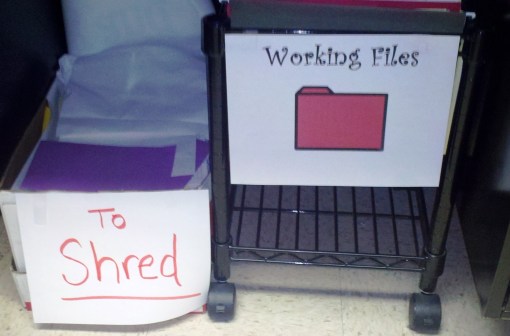
I even use the space underneath my desk — a “shred” bin for those confidential papers, and a rolling file cart that houses a “working file” for each student on my caseload. I use these files to store individualized therapy materials, most-recent progress report and a current copy of the IEP. Some of my students have speech-language files several inches thick that date back as many as six years; this working file system rolls out when I need it and helps keep current information easily at my fingertips.
Beyond my desk is a built-in shelving unit that is not quite accessible, due to the large file cabinet I needed to put about a foot or so next to (in front of) it. I store mostly books and materials I don’t need that often on this shelving unit, accompanied by pictures of my kids and other trinkets:

I also have a built-in cabinet where I house art supplies, story board characters and pieces, cooking supplies, picture cards (ones I do not use frequently,) seasonal items and miscellaneous therapy supplies. The cabinet is spacious and holds a lot of items in an organized fashion:

At the far end of the room, I have a refrigerator (my own) with some storage on top. In the storage drawers I keep things like glue sticks, stickers, game pieces, dice, and magnetic chips. Markers, crayons, pens and pencils are also within reach:

Above the refrigerator, there are some open shelves where I keep enticing toys (up out of reach so that students have to make verbal or picture requests. No rewards for pointing in this room!) I also have free-standing therapy mirrors, and roughly two-ton pottery pieces that my sons made at pottery camp many years ago; I can’t yet bear to part with them…perfect top shelf office decor! 🙂

To the right of the refrigerator (and behind my therapy table,) I have a bulletin board atop the shelving unit. I use this board to display our school-wide behavior plan poster — a nice reminder for the students and a nice way to prevent me from having to continually update bulletin board displays!  Look closely on  the lower right side of the bulletin board and you will see some visual prompts I keep on pocket rings…I use these often with students who need behavior supports; many of these students have their own pocket rings I gave teachers use with them throughout their school day.

On the counter below the bulletin board, I keep my artic cards, picture vocabulary cards and other Fun-Deck materials. I also keep binders with adapted reading program materials, Core curriculum standards and other resources.

Well, there it is. My small but sweet therapy space where amazing things happen! Hope you have enjoyed this up-close and personal tour of my home away from home. I would love to know how this room compares to rooms that other SLPS use — I am grateful for this space but always wishing for a bigger room to allow for even more creativity (I’m thinking circle-time area, play house, puppet theater, pretend store, gross motor area and more!) A girl can dream, right?! Thanks for taking a peek and for visiting LiveSpeakLove!

Free Downloads, Holiday Theme, Resources

Ode to the Doc

I didn’t forget…his birthday is almost here. Most people who work in an Elementary school know exactly who I am talking about.  THE Doctor. The ultimate genius in early learning, phonemic awareness and word family skills. Yes, the inspiration for celebrations like Read Across America and Tasting Parties featuring green eggs and other foods…You guessed it, Theodor Seuss Geisel; A.K.A., Dr. Seuss.

I received a few messages asking me if I have any Bingo Boards with the Dr. Seuss theme. Of course!! Every SLP could have their own as well, with the fabulous creation tool (Boardmaker) and the ever useful “shuffle button.” If you have ever created even one Bingo board in Boardmaker, you just need to edit the pictures to reflect your new theme; save as; highlight the buttons; shuffle; save as (repeat 4 more times to make a set.) That’s it…seriously SO easy and the creations can be used to target a multitude of skills. I will say that I am using Bingo boards and similar activities less often now, with my focus on incorporating  interactive technology and multi-media resources into my regular therapy. But I firmly believe that every holiday deserves a good Bingo Board….and so, in honor of the Doc himself, here you go…

My Birthday Bingo Board Based on Books Poem:


So, without further debate or delay,

I bring you this resource, a game to play.

Just click and download each Bingo file

For you and your kids to enjoy awhile.

The pics are great; the pics are grand

And help kids express and understand

So play; discuss, with smiles and looks

A birthday game that’s based on books.

This game is more than Mother Goose…

We are talking Dr. Seuss!!


Free Downloads, Language, Resources

Question-able Material

Many students on my caseload have language difficulties impacting their ability to answer simple questions — a deficit that has the potential for considerable effects on a student’s ability to perform successfully in their educational environment. Think about a typical classroom activity, and the types of things a teacher might say…odds are pretty good that a majority of a teacher’s utterances involve a simple or higher level wh question word (what, where, who, when, why, how, what if?)  Reading comprehension is especially dependent on these powerful words (Who is the main character? What happened at the end of the story? Why did they make that decision? What do you think will happen next? Where did the story take place?)  Math is also tied to these questions (What is the first step? When do you combine groups?)  Because teachers continually elicit responses and assess skills, questions are routinely asked and answered in the classroom. Students with wh question difficulties need training on exactly what the individual words mean and appropriate referents that can be used as an answer. When asked a simple question like, “what did you eat for lunch?” a student with comprehension deficits might answer, “I eat my lunch.” Many times correct answers can be elicited with scaffolded supports such as yes/no questions or given choices. Systematic practice on these types of questions help students to more automatically comprehend the intended meaning and successfully respond. I often use visual supports to provide cues and structured practice on choosing appropriate referents.  Here is a visual prompt that I use to prompt students in therapy activities and also to use in their classrooms as a resource during instruction:

Simple WH Questions 

To help students differentiate between the types of simple questions, I often use a sorting activity (this activity works very well on my Promethean ActivPanel, where students can drag the pictures to the appropriate column. I also send home the hard copy for practice using verbal responses, or to use as a cut-and-paste activity):

And here are several practice activities I made to address simple wh questions:


I have had good success using simple, Boardmaker-created activities like these to provide structured training on wh question comprehension. As a student becomes more proficient at answering these types of questions, I extend this skill to simple picture scenes, story sequences, and eventually, story recall and comprehension in the classroom. I also spend time educating staff in using wh questions whenever possible, rather than simpler yes/no questions  or even just plain directives. For example, instead of saying, “Put that paper in your folder please,” a teacher might instead present, “Ok, where do you think the paper should go?” Embedded opportunities to practice these comprehension skills throughout a student’s day help to reinforce the therapy activities and promote generalization of skills. Finding opportunity is really not a difficult task…questions are everywhere!

Enjoy the resources — click the images to download and thanks for visiting me at LiveSpeakLove!

Thoughts and Inspirations

American Girl Dreams

I almost didn’t post this entry. I admit that I am probably over-dramatic, and posts like these probably detract from the competent, professional image I often try to project. But I am trying to be authentic in my blogging efforts, and perhaps admitting that I often feel rather incompetent in the scope of my work is very authentic indeed. No downloadable resources in this post; sorry…today is a day for a bit of reflection. Enjoy, or not….this is me, doing my best to LiveSpeakLove.

******************************

Today I entered the beautiful, picturesque world of American Girl. After years of playing super heroes, dragons and ninjas with my older boys, I was now perfectly delighted to sigh and squeal in delight at exquisite eighteen-inch dolls and their miniature shoes, clothes and numerous accessories. I had no idea how inconspicuously captivating this world would be. Visiting one of their stores today was admittedly a sensory-rich experience, with endless displays of distinctive dolls in various poses. Their charming accessories, furnishings, pets and attire all documented their participation in the most wonderfully enjoyable activities. Slumber parties, sports games, music & theater performances, cooking extravaganzas and acrobatics…these American Girls were apparently living the American Dream. I watched my own American Girl, her eager smile and glazed expression slowly taking in the scenes around her. The hours she had previously spent in  “research,” poring over each page of all the catalogues that came in the mail could not have prepared her (or me) for the hypnotic confections that surrounded us as we walked through the store. I watched her eyes dance and shine, her breath catching a bit as she glimpsed one item after another which brought delight to her mind and heart.

My girl carefully but adamantly chose the doll with glasses, Molly, and a cooking kit so Molly could bake cupcakes (generous gifts from her grandmother.) We then lunched in the Bistro with Molly, who sat in a high chair provided by the restaurant. The day was carefree, fun; full of wonder and possibility. We cheerfully left the store feeling happy and content. As we drove home, my girl clutched her doll tightly and whispered to her throughout the ride. My thoughts drifted to the scenes of the day….my mind recalling the swarms of girls entering the store; group after group all having similar, wonderful experiences. All of the girls beaming with excitement to share in this real-yet-make-believe world.

My mind then drifted to my students at work, and it dawned on me that many of the girls in my school might never have even a similar experience. Never. I took note of this abject disparity –as a mom, I felt grateful to share days like today with my girl; her pure delight in this perfect, childhood experience warmed my heart. As an SLP working with some complicated kids, I ached to give these same experiences to all of the children on my caseload. My thoughts acknowledged that many of my students could not have tolerated the sensory input of the store, and many of their families could not have afforded the gifts that we were given today. The SLP in me sat thoughtful for a long while, dreaming for a way to make things different.

Dilemmas like this one strike me every so often. I wish there were a way to help my students, in all of the ways they need to be helped. The work I do with and for these children is often over-shadowed by clouds of paperwork, federal IEP timelines, caseload management constraints and factors over which I know I have no control. While I do my very best to give students engaging, differentiated therapy experiences to promote growth and success, I always wish that I could do more. I wish I could fix the disorders; dissolve the difficulties. I wish I could give disadvantaged families the money they need. I wish I could give parent-less students a stable home life. I wish I could erase harsh moments that forever shadow a student’s life. I wish I could give them all exactly what they need; give them everything they need, with lives as abundant  and rich as the fictitious characters of the American Girl world. But I know I can’t.

Tomorrow, I will go to work and immerse myself in the therapy activities I have planned; collecting data, writing reports and helping each child to the best of my abilities. My work will help them progress toward mastery of IEP goals and objectives. Their skills will slowly improve.  Tomorrow I will teach, and my students will learn. But today; right now, I wish that I could take each child on a trip to the American Girl Store.

Articulation, Free Downloads, Holiday Theme, Language, Resources

St. Patrick’s Day Fun

It’s a nice , three-day weekend for most school-based SLPs! If you are like me, weekends  (especially long ones) are a time to relax, yes, but also a time to plan lessons, catch up on paperwork and reflect on students’ progress. Looking forward to the month of March, I have many St. Patrick’s Day activities planned to target a variety of speech-language goals. Feel free to download the resources; just leave a comment if you can. Thank you!

First, I made a quick, introduction video using Animoto to educate students about St. Patrick’s Day and related vocabulary. Animoto is a wonderful resource to create dynamic videos set to music that will engage students in learning activities. I created this multi-media resource using my own mp3 file and Google images. This video will be used in various flipcharts I will develop for use on my therapy room smartboard (ActivPanel.)These flipcharts can target a variety of levels and skills using a fun, St. Patrick’s Day theme. (Pre-made smartboard resources using a St. Patty’s Day theme can also be found at Smart Exchange.) Here is the short video I made:

If you are interested in using Animoto for yourself, click here.

Other activities planned for various groups include four-leaf clover templates to target word knowledge, wh question comprehension and story elements. Here are some examples:

Template (use an idea below, or adapt for your own activity):

Here is an example of how I used the template for brainstorming object attributes (very important foundation skill for teaching students to compare and contrast.)

Here is the same template used as a graphic organizer for wh questions. This activity could be used to discuss objects and object functions, etc., or it could be applied to stories to teach identification of story elements.

Here is a vocabulary page for introducing/reviewing simple vocabulary words related to the St. Patrick’s Day theme. This page could be used as a low-tech board for St. Patty’s Day games, or as a visual word bank for worksheets and activities:

A fun game that my students always love is Memory. Just print out duplicate copies of the Memory Card page onto cardstock, laminate and you are ready for an open-ended game that could be used to target a variety of speech and language skills. On each turn, students can practice sentence formulation using the vocabulary words, or they can identify similarities and differences using the picture vocabulary. Students can also give their peers “mystery clues” about their chosen cards and see if the rest of the group can guess what the pictures are. You can adapt this game into differentiated activities to address just about any objective:

And, if you are not yet tired of Bingo Boards, feel free to download the set I made using Boardmaker. Take a look at a previous post  for a summary about how I use these board to target a variety of skills:

Copy of Untitled (8.5 x 11 in) (Instagram Post) (7)https://www.teacherspayteachers.com/Product/St-Patricks-Day-Bingo-7867839

For more ideas, check out these links for books, stories and crafts you could use in speech-language therapy sessions:

Wishing everyone a happy, safe rest of February, and a wonderful start to March. Happy St. Patrick’s Day!

Free Downloads, Language, Resources, Technology, Therapy Tools, Thoughts and Inspirations

Visual Supports for Behavior

I was trying to think of a clever title for this entry…some alliterative phrase  that captures the essence of my theme. I quickly decided to stick with the matter-of-fact title, “Visual Supports for Behavior,” because matter-of-fact is what my message is intended to be — children often need visual supports for behavior. We know that certain students respond particularly well to visual supports. Research documents the need for visuals with the autism population, and there are many great options for visuals to use throughout these students’ school day. But what about students who do not have autism? Might they need visual supports as well? Absolutely!

Using visual supports in a school environment targets diverse needs across student populations. Visual supports can tap into the learning styles of students with a preference for visual presentation, assisting them in the processing and storage of information. Visuals can also increase comprehension in students struggling with auditory comprehension, providing a visual prototype that can hold meaning for them in a confusing world of fast-paced direction and instruction . Students with attentional difficulties often need visual supports as well. For a student overloaded with environmental stimuli in a busy classroom, visual supports can help capture their attention and give them a concept on which to focus as they process verbal information.  In addition, many students with executive function difficulties (related to attentional difficulties) might appear to grasp a concept well during group instruction. Students can follow along with information as a teacher visually demonstrates a concept and walks the class through tasks in step-by-step fashion. However, when asked to apply that same skill to complete individual seat work, students with attention and/or executive function  difficulties often flounder. But visual process charts and graphic organizers can help students complete tasks with independence as they practice the skill. A great site for graphic organizers is found here, but I often make my own to meet individual students’ needs.

One way I frequently use visual supports is to address (or prevent) behavior problems. Many students with special needs have deficits that can trigger behavior issues. Students with language difficulties often have difficulty expressing how they feel, or what they want. Issues with impulse control may interfere with classroom routines and social interactions. Students living in poverty or unstable homes may have difficulties coping with the demands of  a structured learning environment. Little three and four year-olds without any prior school experience are now attempting to navigate the social world of new people and new expectations. They long to interact with peers but do not yet know how to properly initiate that interaction. Sitting on the rug at circle time is a challenge when they are accustomed to free play and exploration. All of these issues can cause negative behaviors to emerge, behaviors that can interfere with the learning of others. SLPs are frequently involved in the problem-solving process and are uniquely skilled at developing materials to address such behaviors. Social stories, super pictures, behavior charts,  incentive charts, picture schedules and communication boards are all strategies SLPs keep in their toolbox so that students can make progress in the classroom.

 Here are a few of my favorite visuals, resources that I specifically designed for students needing visual input to assist with comprehension of expectations. I have experienced great success using these simple but powerful tools.

Visual display to help students express how they are feeling (sometimes they don’t even know until the visual seems to “match” what they are experiencing):


Another visual display that was made for a student to keep on his desk so that he could express the emotions he was frequently experiencing: 

Often students need individualized prompting during instruction time to follow classroom rules and expectations. Younger students and/or students with impulsive behaviors need one-step verbal commands to remind them of what they should be doing. These pictures can be cut apart, laminated and placed on a key ring for portability and easy access, or they can be enlarged and cut apart to use as a super-picture presentation. I keep these pictures and other similar visuals in a pocket chart on the wall in my therapy room:

One of my FAVORITE, most often-used visual is the First-Then board. I am posting one template below, but I have many other styles I frequently use. I have also been known to grab post-it notes in a therapy moment when necessary, and draw pictures depicting the first-then expectation. I verbally use this terminology to communicate expectations, even with my own children. “First homework; then T.V.”  The idea is to state the expectation, and when it is finished a more preferred activity can be completed. The first-then chart posted below was used most successfully with a high-functioning student with autism who could complete his classwork with assistance when he tried, but he often became overwhelmed and refused to attempt anything. The classroom teacher and I worked together with the student to identify a list of brief, preferred activities that could be used as a reward after he finished his assignment. The student chose pictures of the preferred activities to place on the bottom row of the chart each day (things like get a drink, color a picture, take a walk, say hi to people in the office, etc.) For each activity he was assigned, he chose one of his preferred options and placed it on the “then” spot. (e.g., First – math worksheet; Then – color a picture.) With a motivating goal easily within reach, the student was able to complete chunks of work and take mini-breaks for rewards throughout his day. His meltdowns literally vanished within a day or two of introducing this tool:

For students needing a visual reminder of how to make “happy” choices, I often use these supports:

A great tool to give (positive and negative) feedback to a student while you are teaching is a non-verbal signal or visual — no need to stop instruction and give negative attention to a child who is misbehaving. With older students, a simple thumbs up or down could work. With younger students, I like to use the happy face/ sad face flip visual. Just cut out the two circles, laminatend tape to opposite sides of a craft/popsicle stick. Present any student with nonverbal feedback as you continue with your lesson. I have witnessed more than a few students break their cycle of negative behaviors by experiencing confidence and success when they are rewarded positively with the “happy” side (catch them doing something positive whenever you can — it works!)

The beauty of visual supports is that they can be tailored to exactly fit the situation at hand. Programs like PowerPoint, Boardmaker, ActivInpire, MS Word, and many others allow for creative design and image selection. The internet hosts a wealth of ideas, templates and other resources to help in the process. The bottom line? Many SLPs and teachers encounter students who are struggling to meet curricular and behavioral expectations. Can we eliminate what is causing those issues?  Unfortunately, not usually. But visual supports are a wonderful tool (and in my experience, sometimes the solution) to helping these students move beyond barriers that block their progress. Increased comprehension, independence and compliance result in better learning opportunities for students, and better relationships with those around them.

Articulation, Free Downloads, Language, Resources, Technology

President’s Day in the Speech Room

Well, Valentine’s Day was a hit in the speech room; now it’s time to move to the next theme-based holiday, President’s Day! (Does anyone else think the year is just flying??) Each year, I am surprised to hear how little my students know about the Presidents. Today I asked a group of students, “What does the President do?” Aside from saying generic statements like, “He’s the boss” or “He is in charge of things,” the students had great difficulty telling me more specifically what the President does, or even who he is ” bossing around.”  As I prompted them with WH questions to elicit more details, the students responded with comments like, “He is in charge of Maryland” and “He is the boss of the whole world.” Granted, these students are language-delayed and have difficulty retaining information, but  the conversation made me realize that I need a way to help them visualize the organization of our world. I plan on using this idea to give them a concrete representation of where they live (and who the President is in charge of bossing!):

I also plan on using some fun, educational vidoes in my ActivInspire flipcharts to give students some background knowledge of George Washington, Abraham Lincoln and related vocabulary. Here are some that I like:

George Washington:

Abraham Lincoln:

A President’s Day Song:

 And this video I’ve included about the 50 Nifty United States, mostly because it’s a really cool song that my oldest son learned and performed years ago when he was in Elementary school. He practiced it so often that our entire family learned to sing with him and can now list all the states in alphabetical order!

Along with the flipcharts and embedded videos, I have some materials prepared that can be inserted into the flipcharts and also printed to send home with students or to document their ideas and annotations. These activities can be used to elicit basic communication and higher-level language skills, as well as to practice articulation skills. Click to download if you liek them!


This open-ended game board can be used to target virtually any speech-language skill. Check out this post for a glimpse at how I used a similar open-ended board on the ActivPanel:

I am looking forward to exploring vocabulary, discovering facts and having some genuine conversations with students about the President’s Day theme, incorporating these fun materials. Hope you enjoy them too! Leave a comment to let me know if/how you used the materials. Thanks!

~Lisa

Thoughts and Inspirations

Feeling the Love

Happy Valentine’s Day from LiveSpeakLove! I am feeling the love today. Not only did I get valentines, candy, hugs and smiles from amazing students on my caseload, but I got some blog-love today from people I have never even met. PediaStaff, a national pediatric-based company for therapists, found my blog and Pinterest Speech Therapy Board, and added me to their database of resources. With over 12,000 Pedistaff followers, some of my speech-language ideas and materials are spreading across Pinterest pretty quickly, generating an amazing amount of blog hits. I am getting emails and messages from other therapists, educators and parents, thanking me for sharing my ideas and resources. A nice treat for me in the form of inspiration — what better tribute to this special day???

Here is a snapshot I’ll share with you of a Valentine’s Day activity in my therapy room…two of my older students using my open-ended Valentine Game board on the ActivPanel smartboard. I first took a screenshot of my Boardmaker file and saved it as an image, then inserted the picture into a desktop flipchart. Then, I “locked” the image into position for use as a game board. We used the shape tools to create colored icons to use as game pieces, which could be moved around the game board as they took turns rolling the die. Ta-da…instant, interactive, virtual game board that we paired with articulation cards to target /s/ blends in sentences and sentence formulation skills. The girls loved the game format, and told me they, “can’t wait” to use the board again.

Happy Valentine’s Day to you, and thanks for spreading the love!

~Lisa

Articulation, Free Downloads, Language, Resources

Achoo!

Yes, it’s that time of year. I have been liberally doused with a sluice of sneezes, and my tissue supply is precipitously dwindling. My own family has been sick off and on for the past few weeks, including myself, an annual affliction that makes me yearn for spring’s fresh air and sunshine. I know, not yet.

While I am waiting for Spring, I often choose the month of February to remind students of important healthy habits. I’ve included a few favorite resources to share. If you like what you see, feel free to download — just click on the images and leave a comment under the post below to let me know. Thanks!

Given the popularity of the recent posting of my Valentine Bingo Boards, I thought I would share my ACHOO! Bingo boards as well, loaded with concept and theme-based vocabulary. I often spend time discussing the vocabulary words, and the steps necessary to maintain a healthy body. Extension activities include listing/sorting items in given categories (e.g., healthy foods vs. unhealthy foods, types of exercise, signs of being healthy vs. signs of being sick) asking and answering wh questions about vocabulary, “turn and talk” time with peers to discuss how being sick feels, etc. The Bingo boards are merely an entryway for language-rich activities and discussion. Enjoy!

I also take time to discuss proper hand washing to prevent germs from spreading. A website with lots of ideas for teaching K-3 kids about germs can be found here. I also like to use a handwashing picture sequence to illustrate our discussions. The images can be used as picture cues for students needing step-by-step prompting, and older students can place individual pictures onto a story board using the correct sequence. Sentence formulation skills can be addressed as students retell the picture sequence using ordinal and sequential vocabulary.

February is National Children’s Dental Health Month, so I often use this month as an opportunity to review dental hygiene themes and vocabulary. Kids love to make paint designs using toothbrushes, and I sometimes will co-teach with the occupational therapist in my school to create toothbrush crafts that target fine motor skills (snipping edges of paper to make toothbrush “bristles,” etc.) The American Dental Association has a database of resources to educate children about good dental habits, including downloadable worksheets and posters in English and Spanish.


Here is a picture vocabulary page I made to supplement lessons and discussions on dental health:

One of my favorite ideas is to use the book How Do Dinosaurs Get Well Soon? by Jane Yolen to create  literacy-based activities using the “Staying Healthy” theme. The rhythm and rhyme of this endearing story target phonemic awareness and decoding skills. The themes of the book allow for discussion of content vocabulary and social skills like making good choices. Here is a picture vocabulary page I made using real images from Google Image search and Picture This photo software in Boardmaker: 

To promote student engagement and active listening during the story presentation, I use pinch cards to target the “happy choices” vs. “sad choices” that the dinosaurs make (quick side note –I prefer the terms “happy” choice vs. “sad” choice because I just don’t like using the word “bad” with my students. Even if I am clear about saying it is the choice that is “bad,” I personally prefer not to highlight the negativity that many students hear all too often…and using happy/sad terminology focuses on how they might feel versus other people’s perceptions of who they are or what they do.) Using the happy/sad choice pinch cards, student can respond to “I wonder” statements and WH questions as the story events are revealed (e.g., “I wonder if the doctor thinks the dinosaur made a happy choice or a sad choice?” or “Oh no! The dinosaur is making a big mess! What kind of choice do you think he is making?”) Students “pinch” the correct picture and hold it up in the air…every student has a way of responding and answering the question at the same time using the basic concept vocabulary.

Thanks for checking out LiveSpeakLove! I am enjoying this format to share some things that have inspired me, and I appreciate the feedback from those who feel inspired as well. Stay Healthy!

~Lisa

Assistive Technology, Language, Resources, Technology, Therapy Tools, Thoughts and Inspirations

“SMART” Speech-Language Therapy

I am fortunate to work in a Title 1 school with supplemental funding to provide rich, technological experiences for the developing minds of our children. ELMOS, document cameras, mobile computer labs, and interactive whiteboards are familiar terms to teachers and students throughout my building. Today’s generation of children are ostensibly at a disadvantage if their education does not incorporate technology on a regular basis…a sign of the times. I’ve heard students in my school ask questions that make  me chuckle, like, “What’s an overhead?” or “Can we just Google it and find the answer?” I also had a student recently point to a picture of JFK on the wall in the hallway and remark, “Hey, I know him! He’s in my Black Ops game!” Ahhh yes, sign of the times.
  

Children today are surrounded by multi-media sensory input; instant gratification in the form of video games, cell phone apps, texts, on-demand video streaming, internet search engines and multi-media lifestyles. As a young, hip SLP (just go with it…I’m making a point here 🙂 ) I prefer to reach students where they are and provide therapy activities  incorporating technological resources, whenever possible. Feeling a bit passionate about the idea of addressing multiple learning styles (visual, auditory, kinesthetic and tactile) and building brain connections through  a multi-modal approach to instruction, I even began a technology initiative for the SLPs in my school district this year. A Technology Committe was formed with interested participants, and we have been meeting periodically to develop systems for  creating and sharing technological resources. We hope that other SLPs in our county will take advantage of opportunities to incorporate technology into their therapy sessions. Our work is to be “unveiled” at a professional development next month, and preparing for the presentation is getting me even more excited about the work we have done.

In the LiveSpeakLove spirit of sharing resources, I thought I would post some of my favorite ways of incorporating technology into therapy sessions. My county has a strict policy for the use and approval of technology, so all the ideas I have here are limited to what is currently approved for my school distrcit (i.e., no iPad, iTouch or related technology; web-based applications and sites have been approved through our filter process.)

ActivInspire Flipcharts – My school system uses the ActivInspire software program as one way to create “flipcharts” or lessons to be used on interactive smartboards. I now have a desktop version of the classroom-sized whiteboard in my therapy room, so I am using ActivInpire Flipcharts for individual, small and classroom-sized groups. I really do not work for Promethean or ActivInspire, but this technology has changed the way I provide therapy. Check out this video for a quick overview:

You can create your own flipcharts using the program’s resource libraries merged with your own content, or find unlimited resources to download and adapt at the following sites:

Online Games/Activities – The internet is filled with language-rich games and activities that will engage learners and provide instant reinforcement for task completion. Not to take the place of traditional speech-language therapy with individualized instruction and feedback provided in a monitored, systematic format, online games are a unique supplement to the personal interactions we create in therapy. Some of my favorite sites are:

TinyEye Online Therapy – I found this wonderful, internet-based company several years ago when I worked for them providing online speech-language therapy (via Skype and the ingenious online therapy system they have created) with a school in China. Taking advantage of the time difference, I logged on several times a week after my own children were in bed and provided instruction and feedback to students in China (who were assisted by their teachers during our sessions.) This service delivery model is perhaps the REAL wave of the future. With critical shortages of SLPs throughout our world, companies like TinyEye have devised a way to use technology to meet students’ needs in an efficient, global model for services. Even if you have no desire to Skype with China during your normal snoozing hours (perhaps not for sleep-deprived souls with crazy lives, but I would do it again if a mutually-agreeable contract became available,) you can still take advantage of their online therapy games–FREE for school-based SLPs. Just register with them to receive access to games addressing myriad goals, objectives, skills and targets. Games can be added to online “backpacks” with access even given to students for homework practice. Here is just a sampling of the abundant online resources they offer:

Online "Backpack" of games to target individual students

Farm Game - students click to answer WH qestions involving concept vocabulary
Animated Mermaid Matching game to target articulation skills through matching words or minimal pairs

PBS Kids Online Games – online games linked to curricular content, featuring characters from the PBS shows.

Nick Jr. Online Games – More online games featuring kids’ favorite characters. All of the games feature educational content linked to curriular vocabulary.

SMART Exchange – Images and smartboard lessons that are directly linked to State Curriculum Standards. Simply click on your state, identify the standard, grade level and subject area, and VOILA!! Instant resources available to you that address those standards. Here is a glimpse of a search I did for third grade language arts activities using the Maryland Core Standards:

Online Multi-media resources – Images and videos can be directly inserted into flipcharts, smartboard lessons, or PowerPoint presentations to increase student engagement through visual stimuli, sounds and animation. I frequently search for images to use in Boardmaker documents, to target  populations that comprehend and store vocabulary labels significantly better when real images are used (see this article for a brief rationale.) I also use sound effects and videos frequently in computer or smartboard-based lessons. Children in today’s world — a world filled to the brim with t.v. shows, video games, computer games, cell phone games and so on and so on and so on — love the power in clicking an icon or button to create instant visual or auditory feedback. Here are my favorite tools for creating multi-media delight in therapy activities:

  • Google – Wow, images and animations galore, many of them free! (just make sure you have an antivirus program installed before you click on links you find.) You can search for gif animations, videos, and even use their image search feature to locate the exact image to insert into your lesson.
Snapshot of Google Image search results for "bears"
  • YouTube – Not just for watching Ellen’s Favorite Videos or  the latest Adele performance  — there are amazing, inumerable educational resources found on youtube. Read this entry to see an example of one video I used in a language lesson for young students. My seventh grade son reviews algebra concepts each night by watching youtube videos from KhanAcademy. You can even learn how to increase your use of technology in therapy by watching podcasts from one resourceful SLP!
  • Watch Know Learn – free, organized database of educational videos covering all subjects and grade levels.
  • Self-made video clips – my school purchased several flip cams that many of us use. With these cameras, students can be video-taped (abiding by confidentiality requirements) and inserted into presentations. Therapy sessions can include self-assessment and monitoring pieces with this tool, and provide documentation for acquisition of skills. Plus, kids just like it.
  • Video Montage Programs – Pictures and video clips can be set to music and preserved using slide show programs like Animoto or Windows Movie Maker . I often use programs like these outside of therapy as well (e.g., to document accomplishnents during school-wide assemblies, or to document my own family photos in a creative way.)

This is just a quick overview of some of the tools I routinely use to increase student engagement and give them multiple ways of processing and responding during our sessions. For even more ideas, check out suggestions from the National Center on Universal Design for Learning (UDL.) In addition to technology ideas, their list of suggestions includes ways to adapt materials for various disabilities and activate background knowledge in students across populations. A fantastically huge database of web-based resources is presented as it relates to UDL checkpoints.

Feel free to let me know what types of technology you are using and how your students or children respond. We live in a dynamic, fast-paced world where “smart therapy” means more than just keeping up with the latest reseatch. To be truly “smart,” we now need to step out of our comfort zones a bit and embrace the technology that surrounds us.